 Superfocus
You've tried 25 minutes. It feels wrong—but you don't know why.
Generic advice says 25. Your brain says something else. The wrong length makes every session feel like failure.
The stall
- Force 25. Quit at 10.
- Think you're broken.
- Wrong length, not wrong you.
The block
- Try Sprint, Pomodoro, Flow.
- Find your number.
- Structure that fits.
Suggested Superfocus preset: Pomodoro (25 min) or Sprint (15 min) or Flow (45 min)
Direct answer
The classic Pomodoro session is 25 minutes of focused work, followed by a 5-minute break. After 4 sessions, take a 15-minute longer break. This comes from the Pomodoro Technique developed by Francesco Cirillo. Superfocus supports 25 min (Pomodoro), 15 min (Sprint), 45 min (Flow), and 90 min (Deep Work)—so you can match your attention span. Subscribe.
The standard Pomodoro is 25 minutes, but the best length depends on your task and attention span. Students often use 25 min; developers in flow may prefer 45–90 min.
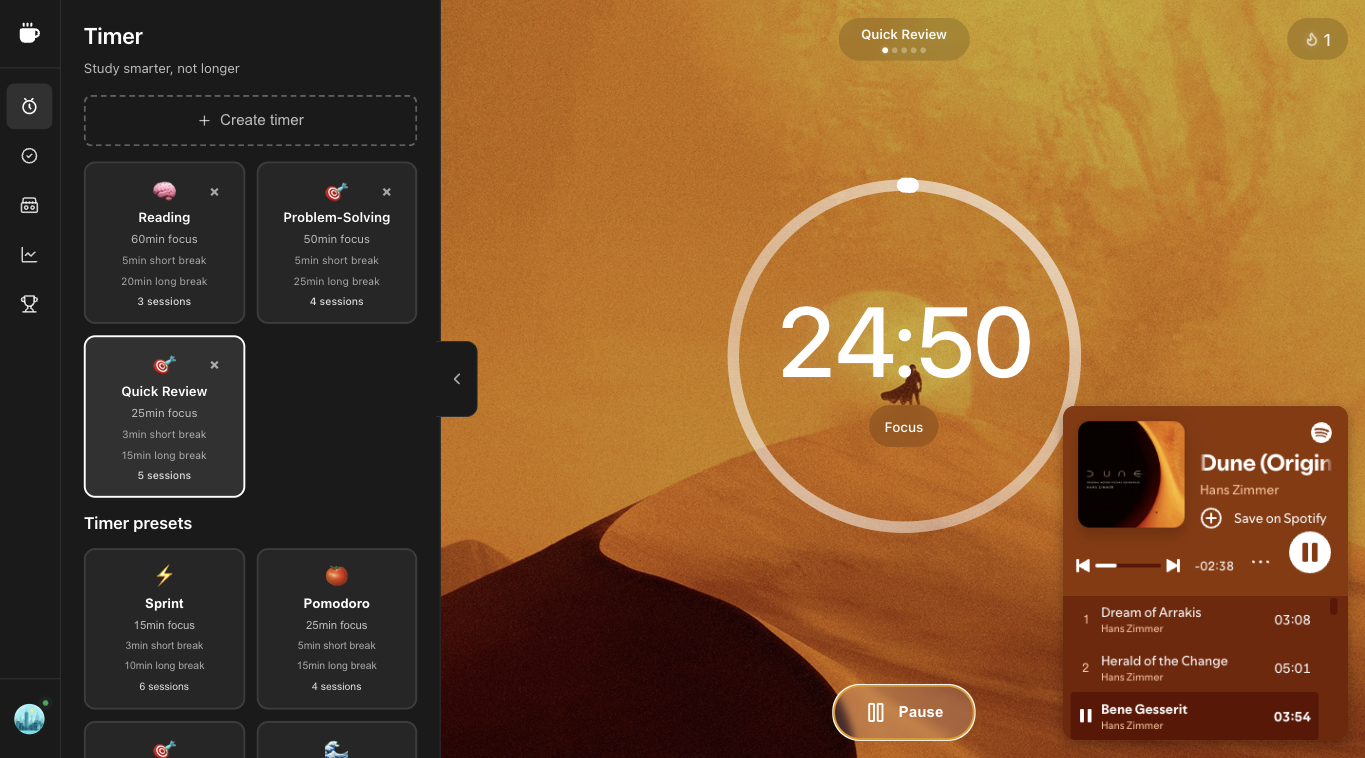
Superfocus lets you switch presets without changing apps—try Sprint (15), Pomodoro (25), Flow (45), or Deep Work (90) and track which length produces the most finished blocks.
How to run a how long pomodoro session session
- Name one outcome. “Study chapter 4” or “write the intro,” not “be productive.” Vague tasks are why people search how to focus and still open Slack.
- Pick Pomodoro (25 min) or Sprint (15 min) or Flow (45 min). If starting feels heavy, cut the block in half. A finished 15-minute sprint beats a abandoned 25-minute pomodoro.
- Start the Superfocus timer and optionally a cassette (lofi, rain, white noise) in the same tab. Do not open a second “study with me” video.
- When it rings, stand up. The break is part of the pomodoro technique, not optional chrome. Then start the next block or stop for the day.
Context for this FAQ
Most pomodoro FAQ answers pretend 25 minutes is law. It is a default from Cirillo’s kitchen timer, not a medical protocol. Match length to the job: start resistance → short sprint; exams and problem sets → classic pomodoro; design or architecture → flow or deep work.
Mistakes that make you've tried 25 minutes. it feels wrong—but you don't know why. feel useless
- Stacking three tools: a tomato timer, Spotify, and a task app. Context switching is the product.
- Skipping breaks until you crash. Cirillo’s pomodoro technique uses 5-minute pauses on purpose.
- Judging the day by hours in a chair instead of finished blocks. Superfocus analytics count completed sessions, not tab time.
- Forcing 25/5 when the work is a 90-minute deep-work problem — or forcing 90 minutes when you cannot start.
Why use Superfocus instead of a kitchen timer
A kitchen timer or a silent chrome pomodoro extension only answers “when does this end?” Superfocus also holds the task, ambient sound, and a record of what you actually finished. That is the gap between a tomato timer novelty and a study timer or focus timer you will reopen tomorrow.
Related searches we designed for: pomodoro timer online, pomodoro technique timer, study timer, and focus timer — not a new productivity religion. One browser tab. $1.99/month after a 7-day trial. There is no free plan.
What Superfocus costs
There is no free plan and no guest timer. Premium is $1.99/month after a 7-day trial. Subscribe, then run how long pomodoro session at /app. If you only need a countdown, keep a kitchen timer or phone clock — do not pay $1.99/month for that.
Questions people actually ask
How long should a Pomodoro session be?
The classic is 25 minutes. Superfocus offers 15 min (Sprint), 25 min (Pomodoro), 45 min (Flow), and 90 min (Deep Work) to match your focus style.
Is 25 minutes the best length?
25 min works for many people—it's long enough for deep work but short enough to avoid burnout. If 25 min feels too long, try Sprint (15 min); if too short, try Flow (45 min).
Is Superfocus free?
No. Superfocus Premium is $1.99/month after a 7-day trial. There is no guest timer.
Keep going
Run this in Superfocus
One plan. $1.99/month after a 7-day trial. No free plan. Timer lives at /app after you subscribe.