 Superfocus
15 or 25 or 45? You've read ten articles and still don't know.
Analysis paralysis strikes again. While you research the perfect length, the task waits untouched.
The stall
- Research the method. Never use it.
- Perfect length myth.
- Task still undone.
The block
- Pick one. Start now.
- Adjust after data.
- Done beats optimal.
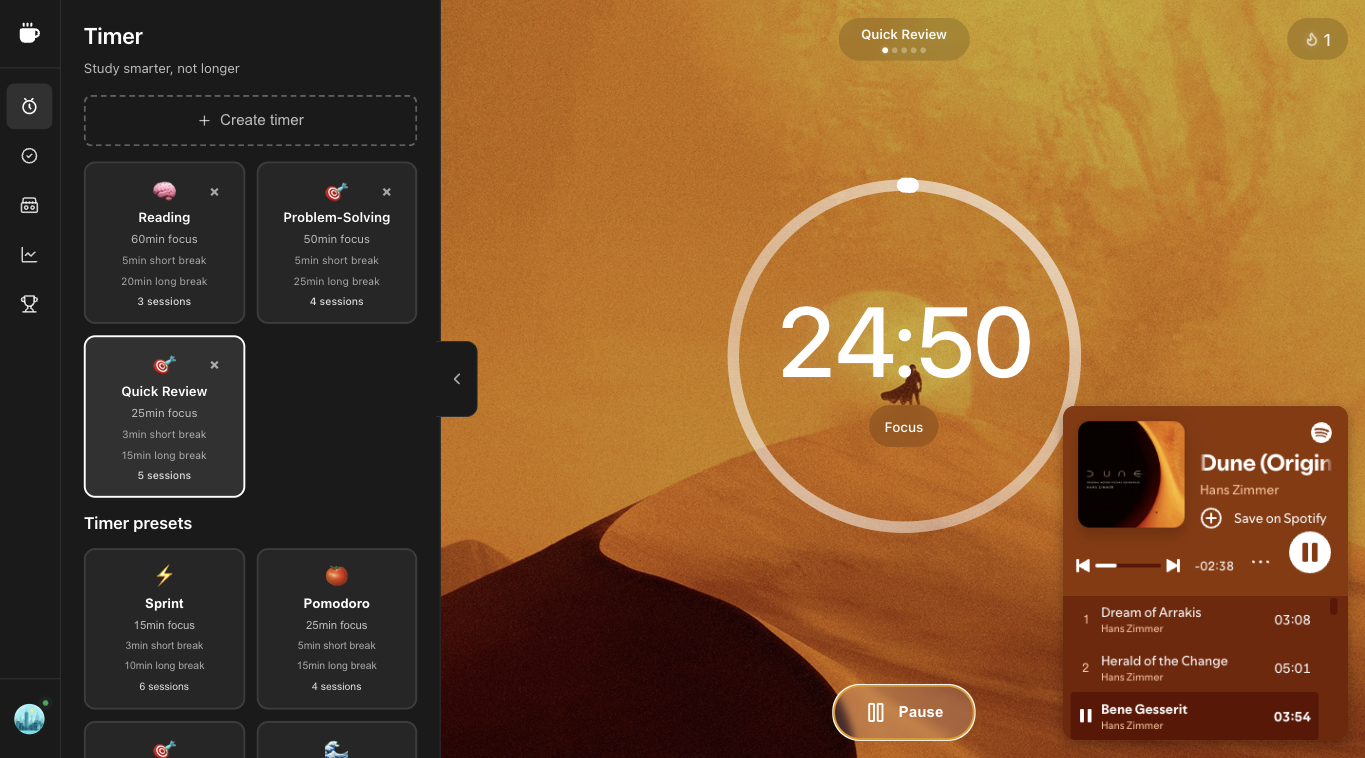
Suggested Superfocus preset: Pomodoro (25), Sprint (15), or Flow (45)
Direct answer
The best Pomodoro length depends on you. 25 minutes works for most people—it aligns with attention cycles and avoids burnout. Use 15 minutes (Sprint) for ADHD, quick tasks, or when 25 min feels too long. Use 45 minutes (Flow) or 90 minutes (Deep Work) for extended focus. Superfocus has all presets built in. Subscribe.
There is no universal best length—25 minutes is the classic default, 15 minutes helps when starting is hard, and 45–90 minutes suits deep creative work. Test one week per preset and compare finished blocks in analytics.
How to run a best pomodoro length session
- Name one outcome. “Study chapter 4” or “write the intro,” not “be productive.” Vague tasks are why people search how to focus and still open Slack.
- Pick Pomodoro (25), Sprint (15), or Flow (45). If starting feels heavy, cut the block in half. A finished 15-minute sprint beats a abandoned 25-minute pomodoro.
- Start the Superfocus timer and optionally a cassette (lofi, rain, white noise) in the same tab. Do not open a second “study with me” video.
- When it rings, stand up. The break is part of the pomodoro technique, not optional chrome. Then start the next block or stop for the day.
Context for this FAQ
Most pomodoro FAQ answers pretend 25 minutes is law. It is a default from Cirillo’s kitchen timer, not a medical protocol. Match length to the job: start resistance → short sprint; exams and problem sets → classic pomodoro; design or architecture → flow or deep work.
Mistakes that make 15 or 25 or 45? you've read ten articles and still don't know. feel useless
- Stacking three tools: a tomato timer, Spotify, and a task app. Context switching is the product.
- Skipping breaks until you crash. Cirillo’s pomodoro technique uses 5-minute pauses on purpose.
- Judging the day by hours in a chair instead of finished blocks. Superfocus analytics count completed sessions, not tab time.
- Forcing 25/5 when the work is a 90-minute deep-work problem — or forcing 90 minutes when you cannot start.
Why use Superfocus instead of a kitchen timer
A kitchen timer or a silent chrome pomodoro extension only answers “when does this end?” Superfocus also holds the task, ambient sound, and a record of what you actually finished. That is the gap between a tomato timer novelty and a study timer or focus timer you will reopen tomorrow.
Related searches we designed for: pomodoro timer online, pomodoro technique timer, study timer, and focus timer — not a new productivity religion. One browser tab. $1.99/month after a 7-day trial. There is no free plan.
What Superfocus costs
There is no free plan and no guest timer. Premium is $1.99/month after a 7-day trial. Subscribe, then run best pomodoro length at /app. If you only need a countdown, keep a kitchen timer or phone clock — do not pay $1.99/month for that.
Questions people actually ask
What is the best Pomodoro length?
25 min works for most. Try 15 min (Sprint) if you need shorter blocks, or 45 min (Flow) for deep work.
Can I customize the length?
Yes. Superfocus has preset lengths and supports custom timers. Create your ideal work/break ratio.
Is Superfocus free?
No. Superfocus Premium is $1.99/month after a 7-day trial. There is no guest timer.
Keep going
Run this in Superfocus
One plan. $1.99/month after a 7-day trial. No free plan. Timer lives at /app after you subscribe.