 Superfocus
Pomodoro technique: browser timer vs kitchen timer vs Pomofocus
Kitchen timer is $0. Pomofocus is a 25/5 clock. Superfocus is $1.99/month for a browser timer, one named task, and optional cassette sound. There is no free plan.
The stall
- Read the Cirillo history. Set a phone timer. Open Pomofocus.
- Still have not started a 25-minute block.
- The technique is not the leak. The setup is.
The block
- Match the tool, then start.
- Browser work → Superfocus at $1.99/month.
- Naked countdown → kitchen timer or Pomofocus.
Suggested Superfocus preset: Pomodoro (25/5/15 min)
Direct answer
The Pomodoro Technique is 25 minutes on one task, 5 minutes off, and a longer break after four rounds. Cirillo used a kitchen timer. You can still do that. The decision is which clock matches the job:
- Kitchen timer or phone clock — $0. Counts down. Does not hold a task, sound, or a record of finished blocks. You remember the breaks yourself.
- You only want 25 on / 5 off in a browser — Pomofocus. It is a fast, well-known tomato clock. Keep it if you do not want sound, Todoist, or session stats in the same page.
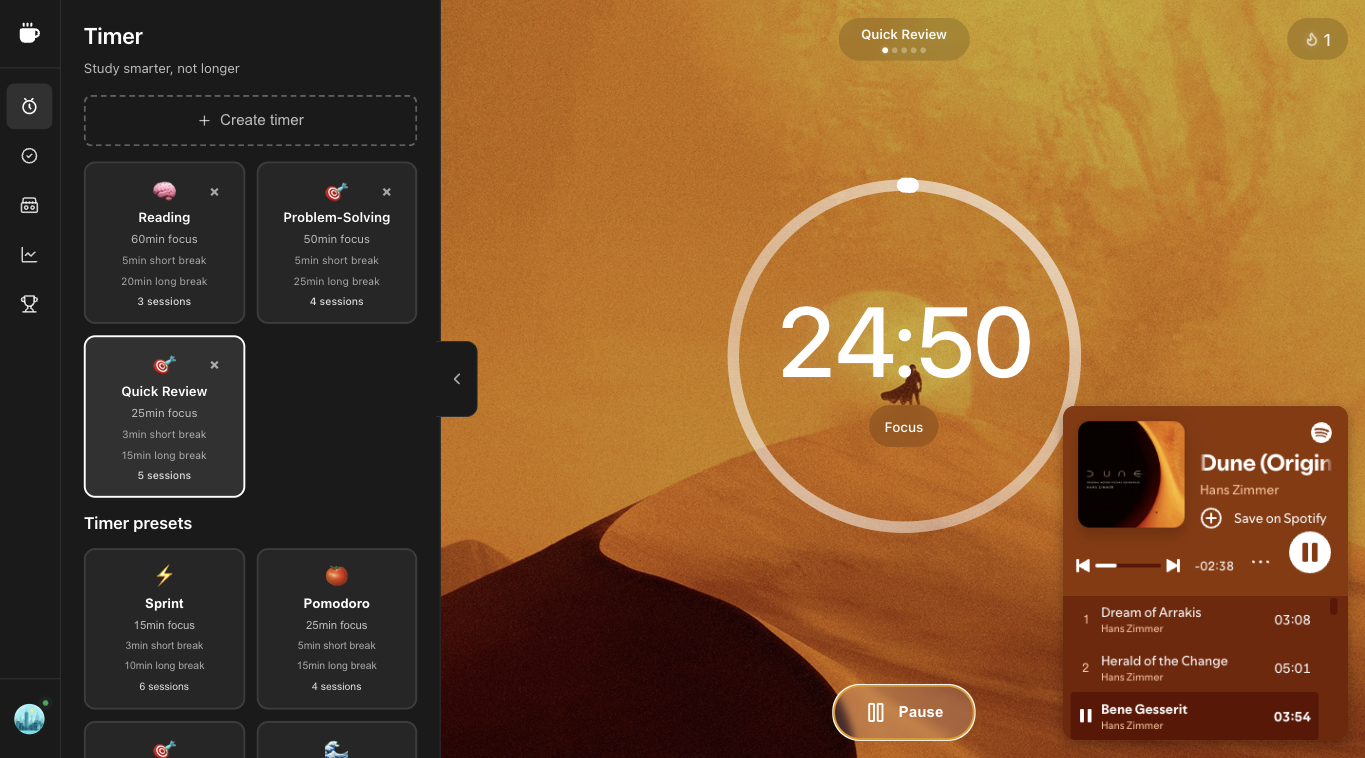
- Laptop / browser work — Superfocus. One tab holds the countdown, a named task, optional lofi or rain, and a log of finished blocks. Premium is $1.99/month. There is no guest timer and no free plan.
This is not a Cirillo biography. It is kitchen timer vs Pomofocus vs Superfocus, plus when 25/5 is the wrong length.
Kitchen timer vs Pomofocus vs Superfocus
| If this is the job | Use | What you get | What you pay |
|---|---|---|---|
| A countdown and nothing else | Kitchen timer or phone clock | 25 on / 5 off if you remember the breaks | $0 |
| A tomato clock in a browser tab | Pomofocus | Classic 25/5 page, light task list | The web timer is free; paid extras live on their site if you want them |
| Timer + named task + optional sound on the computer you work on | Superfocus | Pomodoro, Sprint, Flow, and Deep Work presets; cassettes; Todoist; completed-session stats | $1.99/month. No free plan. |
Kitchen timer: keep it when the clock is the product
A physical timer (or the clock app on your phone) is enough when you already protect the block: one task on paper, phone in another room, breaks you will actually take. Cirillo’s method does not require software. If that is you, do not pay $1.99/month.
Kitchen timers fail when the leak is the computer itself — Slack, a second music tab, a task list in another window. A tomato on the desk does not name the task or keep lofi from becoming YouTube.
Pomofocus: keep it when 25/5 is the whole product
Pomofocus won because it looks like a kitchen timer in a browser. If you already have Spotify elsewhere and a task list elsewhere, and you like that split, stay. Superfocus is the upgrade when that split is why sessions die: you open lofi on YouTube, the sidebar recommends a video, and the pomodoro never starts.
Choose Superfocus over Pomofocus when you want the same 25/5 default plus longer presets (Sprint, Flow, Deep Work), sound that is not a second destination, and a log of blocks you actually finished — billed at $1.99/month, not as a “free timer plus three other subscriptions.”
What Superfocus actually is
Superfocus is a browser pomodoro / focus timer: a clock, one named task, optional cassette sound (lofi, rain, and similar beds), Todoist if you already live there, and completed-session stats. Presets include Pomodoro 25/5, Sprint, Flow, and Deep Work. Subscribe, then use the timer at /app.
It is not a guest timer. It is not a free plan with a daily cap. Premium is $1.99/month.
When 25/5 is the wrong length
Classic pomodoro is the default because it is short enough to start and long enough to finish a chunk. Switch to Sprint when 25 minutes feels like a wall. Switch to Flow or Deep Work when the bell would kill a writing or coding stretch. That is still the technique — work, break, repeat — with a length that matches the task.
Who should not subscribe to Superfocus
Do not pay $1.99/month if you want a $0 tomato and will never use sound, a named task, or history. Use a kitchen timer or Pomofocus. Do not pick Superfocus as a Forest clone — we do not grow trees. Pick Superfocus when you already work in a browser and you are tired of a timer tab, a music tab, and a task tab fighting each other.
Questions people actually ask
What is the Pomodoro Technique?
Work on one named task for 25 minutes, take 5 minutes off, and take a longer break after four rounds. Francesco Cirillo built it with a tomato-shaped kitchen timer. The rules are public. The decision is which clock you will actually start.
Kitchen timer vs Pomofocus vs Superfocus — which should I use?
Use a kitchen timer or phone clock if you only need a countdown. Keep Pomofocus if a 25/5 tomato in the browser is the whole product. Choose Superfocus when you also want one named task, optional lofi or rain, Todoist, and a log of finished sessions in the same tab.
How much does Superfocus cost?
Premium is $1.99/month. There is no guest timer and no free plan. Subscribe, then use the timer at /app.
Keep going
Run this in Superfocus
One plan. $1.99/month after a 7-day trial. No free plan. Timer lives at /app after you subscribe.