 Superfocus
Focus website for studying: kitchen timer vs YouTube vs Pomofocus
Kitchen timer is $0. YouTube study-with-me is a video tab. Pomofocus is a 25/5 clock. Superfocus is $1.99/month for a browser focus site: one named task and optional cassette sound. There is no free plan.
The stall
- Search focus website. Open a study-with-me video. Set a phone clock.
- Still have not started the chapter.
- The site is not the leak. The extra tabs are.
The block
- Match the tool, then start.
- Laptop studying → Superfocus at $1.99/month.
- Countdown only → kitchen timer. 25/5 only → Pomofocus.
Suggested Superfocus preset: Pomodoro or Sprint
Direct answer
A focus website for studying is a destination you open so the block can start. You can still use a kitchen timer. The decision is which page (or object) matches the job:
- Kitchen timer or phone clock — $0. Counts down. Does not hold a task, sound, or a record of finished blocks. You remember the breaks yourself.
- YouTube “study with me” — a livestream or video with a clock overlay. Company is the product. The sidebar is the leak.
- You only want 25 on / 5 off in a browser — Pomofocus. It is a fast, well-known tomato clock. Keep it if you do not want sound or a named task in the same page.
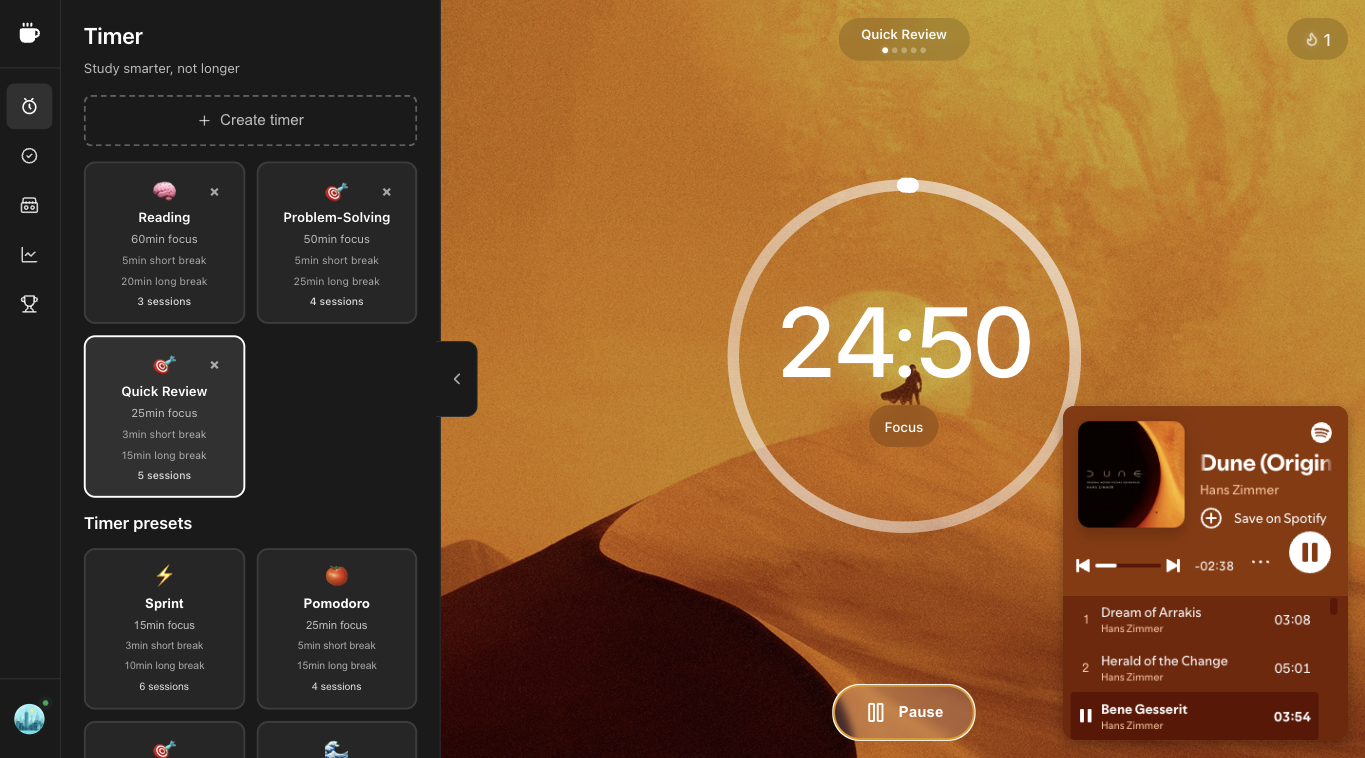
- Laptop / browser studying — Superfocus. One tab holds the countdown, a named task, and optional lofi or rain. Premium is $1.99/month after a 7-day trial. There is no guest timer and no free plan.
This is not a list of aesthetic study tabs. It is kitchen timer vs YouTube study-with-me vs Pomofocus vs Superfocus.
Kitchen timer vs YouTube vs Pomofocus vs Superfocus
| If this is the job | Use | What you get | What you pay |
|---|---|---|---|
| A countdown and nothing else | Kitchen timer or phone clock | 25 on / 5 off if you remember the breaks | $0 |
| Someone “in the room” while you study | YouTube study-with-me | A video plus a clock overlay | Free video. The cost is the sidebar. |
| A tomato clock in a browser tab | Pomofocus | Classic 25/5 page, light task list | The web timer is free; paid extras live on their site if you want them |
| Timer + named task + optional sound on the computer you study on | Superfocus | Pomodoro, Sprint, Flow, and Deep Work presets; optional cassette sound; one named task | $1.99/month after a 7-day trial. No free plan. |
Kitchen timer: keep it when the clock is the product
A physical timer (or the clock app on your phone) is enough when you already protect the block: one assignment on paper, phone in another room, breaks you will actually take. Studying does not require a website. If that is you, do not pay $1.99/month.
Kitchen timers fail when the leak is the laptop itself — a second lofi tab, group chat, a task list in another window. A tomato on the desk does not name “problems 4–12” or keep a study-with-me video from becoming the activity.
YouTube study-with-me: keep it when company is the product
A study-with-me video is not a focus website. It is a stream you sit next to. Keep it if silent rooms make you quit and you will not click recommended videos. Leave it if the “timer” is how you open YouTube and never start the chapter.
Superfocus is the opposite job: one browser tab with a countdown, one named task, and optional cassette sound so lofi is not a second destination.
Pomofocus: keep it when 25/5 is the whole product
Pomofocus won because it looks like a kitchen timer in a browser. If you already have Spotify elsewhere and a task list elsewhere, and that split still lets you start the chapter, stay. Superfocus is the upgrade when that split is why sessions die: you open lofi on YouTube, the sidebar recommends a video, and the study block never starts.
Choose Superfocus over Pomofocus when you want the same 25/5 default plus longer presets (Sprint, Flow, Deep Work), sound that is not a second destination, and a named task in the same tab — billed at $1.99/month after a 7-day trial, not as a “free focus website plus three other subscriptions.”
What Superfocus actually is
Superfocus is a browser pomodoro / focus timer: a clock, one named task, and optional cassette sound (lofi, rain, and similar beds). Presets include Pomodoro 25/5, Sprint, Flow, and Deep Work. Subscribe, then use the timer at /app.
It is not a guest timer. It is not a free plan with a daily cap. It is not a free focus website for students. Premium is $1.99/month after a 7-day trial.
When 25/5 is the wrong length for studying
Classic pomodoro is the default because it is short enough to start and long enough to finish a chunk of reading or a problem set. Switch to Sprint when 25 minutes feels like a wall — flashcards, a cold start, or a night when you would otherwise open the phone. Switch to Flow or Deep Work when the bell would kill an essay or a proof. That is still a focus website for studying — work, break, repeat — with a length that matches the assignment.
Who should not subscribe to Superfocus
Do not pay $1.99/month if you want a $0 tomato and will never use sound or a named task. Use a kitchen timer or Pomofocus. Do not pick Superfocus as a study-with-me clone — we do not stream other students. Pick Superfocus when you already study in a browser and you are tired of a timer tab, a music tab, and a YouTube tab fighting each other.
Questions people actually ask
What is a focus website for studying?
A focus website for studying is a browser page you open to start a learning block — not a video to ignore. A kitchen timer only counts. A YouTube study-with-me tab is entertainment with a clock overlay. Superfocus is a timer, one named task, and optional sound in the same tab.
Kitchen timer vs YouTube vs Pomofocus vs Superfocus — which should I use?
Use a kitchen timer or phone clock if you only need a countdown. Keep a study-with-me video if company is the product and you will not click the sidebar. Keep Pomofocus if a 25/5 tomato in the browser is the whole product. Choose Superfocus when you also want one named task, optional lofi or rain, and a log of finished sessions in the same tab.
How much does Superfocus cost?
Premium is $1.99/month after a 7-day trial. There is no guest timer and no free plan. Subscribe, then use the timer at /app.
Keep going
Run this in Superfocus
One plan. $1.99/month after a 7-day trial. No free plan. Timer lives at /app after you subscribe.